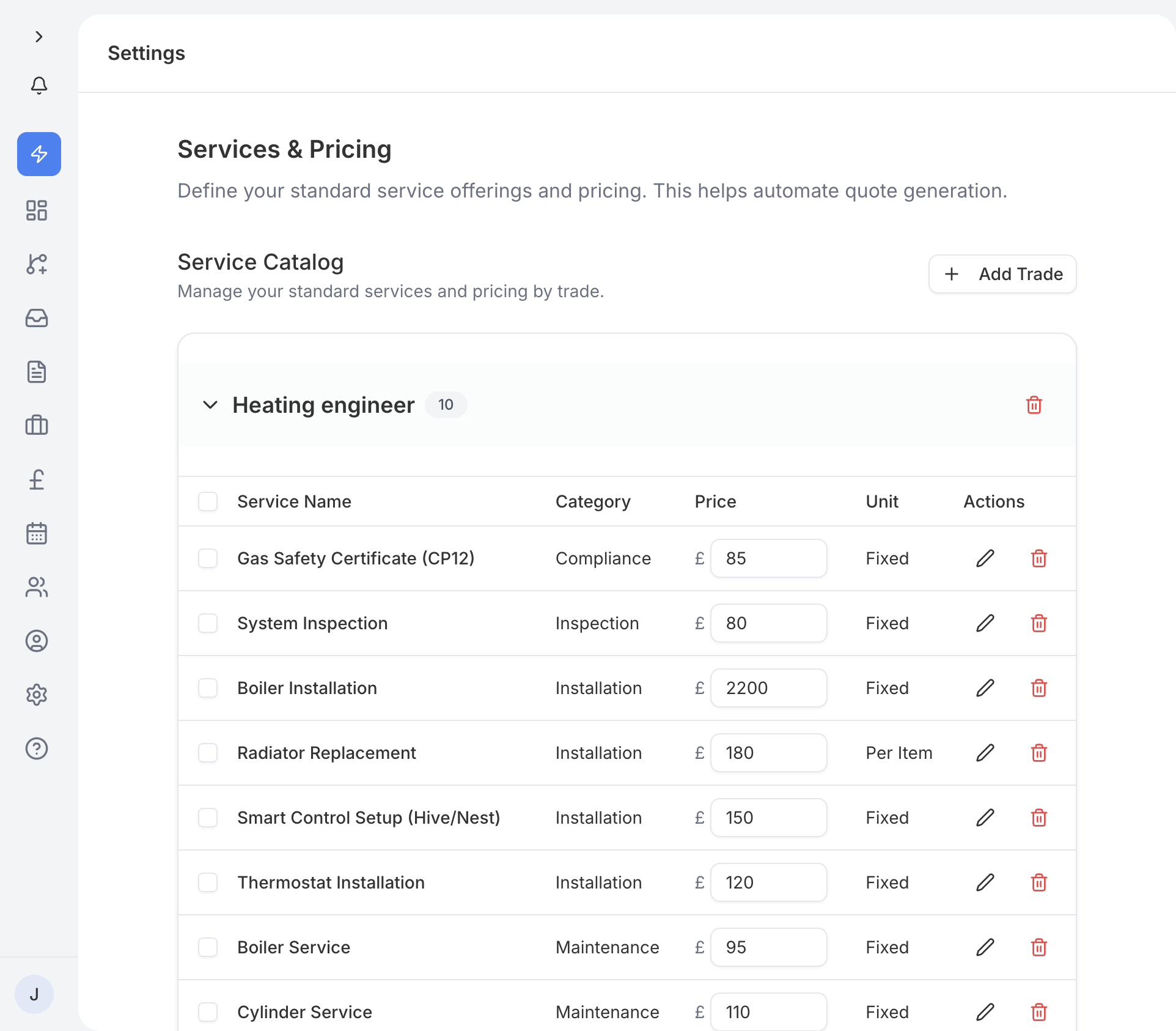
Your services list is where you define what you offer and how much you charge. You can find it in Settings under the Services section.
When you add a new trade type to your account, traidhand automatically seeds a set of default service items with suggested prices. For example, adding "Plumber" will create services like "Boiler Installation", "Radiator Replacement", and "Leak Repair" with typical starting prices.
This gives you a head start - you can keep the defaults as they are or adjust them to match your own rates.
Each service has a default price that you can edit inline. Simply tap the price, change it, and save. This default price will be pre-filled whenever you add that service to a quote or job, saving you time.
If the default services do not cover everything you offer, you can add your own. Tap Add Service, give it a name, set a price, and assign it to a category.
Services are grouped into categories based on trade type. This keeps things organised, especially if you cover multiple trades. Categories also help when customers are selecting a service on your public enquiry form.
When you create a quote or edit a job, your services appear in an autocomplete dropdown. Start typing the name of a service and traidhand will suggest matching items along with their default prices. Select one and the price is filled in automatically - you can still adjust it for that particular quote or job.
Some trade types, such as Garden Room Builder, support package-style pricing where a service covers a complete project rather than an individual task. These work the same way - they appear in the autocomplete dropdown and can be customised to suit each job.